The FlyerFunds Rebates program has been offered by Frugal Flyer since 2021. The program is our way of rewarding loyal readers who use our site to sign up for their next credit card or bank account in Canada.
Over the years, we’ve received many questions about this program. So here is a brief guide to using the FlyerFunds Rebates Program for extra cash back on your next financial product application.
The Basics of the FlyerFunds Rebates Program
The FlyerFunds Rebates program is your best opportunity to get extra cash on your next credit card or bank account rebate application. We work closely with major Canadian financial institutions, who pay us a commission for your approval, and then in turn we pass a portion of that commission back to you.
The FlyerFunds Rebate amount you will see on many of the products mentioned on Frugal Flyer is in addition to any welcome bonus on the product. For eligible approvals, Frugal Flyer fulfills the FlyerFunds rebate, while the financial institution fulfills the miles, points, or cash back portion of the welcome offer. You do not miss out on the welcome bonus by applying through Frugal Flyer.
FlyerFunds rebates are paid via PayPal. When tracking works properly, FlyerFunds rebates take at most 8 weeks for approval and payment, but more often the process is completed within weeks or even days. In exceptionally rare cases, we must undergo an appeal process with banks, which extends the timeline beyond 8 weeks, but still within a maximum of 12 weeks.
We also offer a FlyerFunds Loyalty Bonus, where readers who use us for four financial product approvals will receive an extra bonus of $20.
While this article should answer all of your questions, if you are unsure about anything to do with FlyerFunds, feel free to email our team at [email protected].
How to Apply for a FlyerFunds Rebate on a Credit Card or Bank Account
Before you consider applying for a new financial product via the FlyerFunds Rebates program, we recommend that you disable ad blockers and ensure cookies are enabled in your web browser of choice and accepted on the financial institution’s website as well. Both of these settings give the affiliate link tracking a better chance of functioning properly, allowing us to confirm your rebate and have it paid more quickly.
Here’s an example of what this looks like in Google Chrome:
We also highly recommend ensuring that you complete the application entirely online if possible. Visiting the branch or applying over the phone can result in you not being eligible for the rebate, because the sign-up and approval may be unable to be linked to Frugal Flyer.
Once you are ready to apply, you can view a list of all current FlyerFunds Rebates here and can click on “GET THIS OFFER” on the financial product you are interested in to be taken to the rebate application page.
Alternatively, if you see the credit card or bank account mentioned on any of the pages on Frugal Flyer, you can click the “Apply Now” button, and you will always be taken to the rebate application page for that specific credit card or bank account.
Upon landing on the rebate application page, you’ll see details and a form that looks like this:
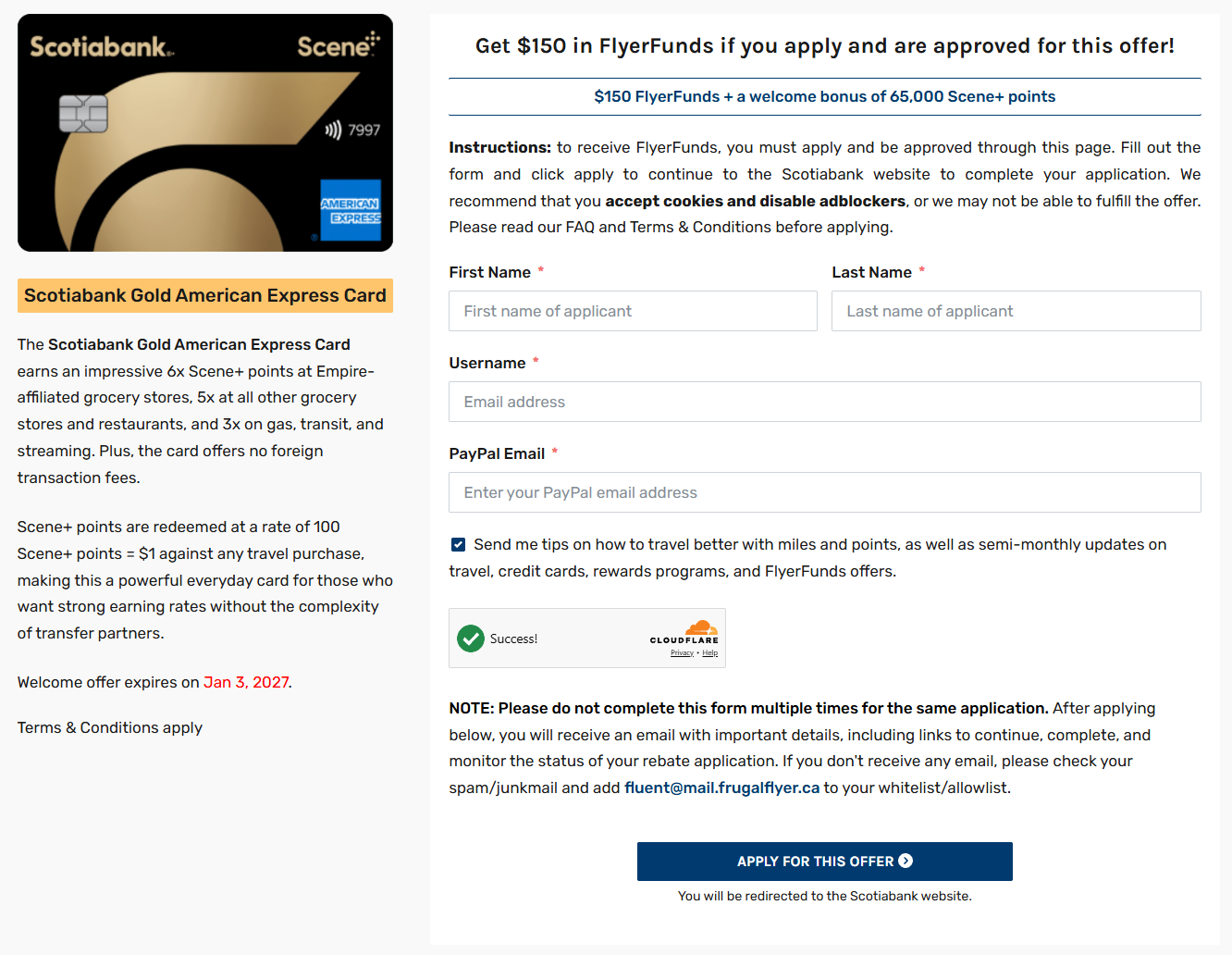
In order to complete the rebate application, you will need to provide your legal first and last name, email address (which will also be your username to log in on FrugalFlyer.ca), and PayPal email address for rebate payment. You will not be able to update the PayPal email address after submitting this form, but if you need to change it, please email us at [email protected].
We recommend providing the same legal name and email address that will be used when applying for the financial product, as it can reduce issues when it comes to verifying your rebate application with our financial institution partners.
Once those fields are populated, click on the “Apply For This Offer” button. You will be redirected to your newly generated unique rebate application page, and a new tab will open on the financial institution’s website for you to apply for the product. Be patient, as it can take a second.
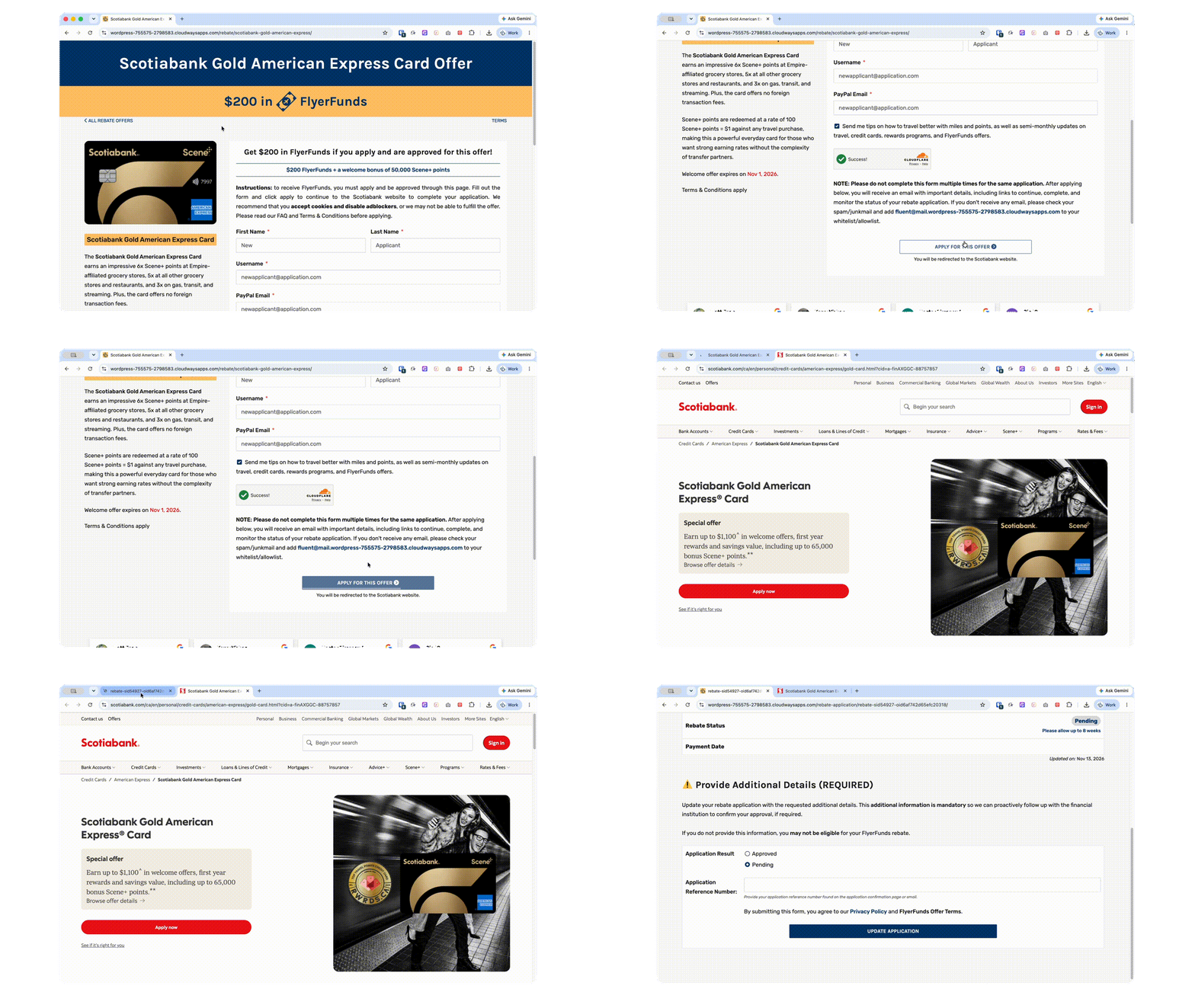
If there isn’t a new tab that redirects you to the financial institution website to apply, you can also click on “Link to Application” on your unique rebate application page. Please try to avoid generating duplicate rebate applications for the same financial product.
At this point in time, you can now apply for the credit card or bank account that you have generated a FlyerFunds rebate application for. It is imperative that you click through the unique link we provide you when applying, as that is how we are able to track your approval and, in turn, have your rebate paid.
On your unique rebate application page, you will find a summary of details about your rebate application. If you need to get back to this page, you can do so via the link you received in your email or via the FlyerFunds Rebate Status Dashboard.
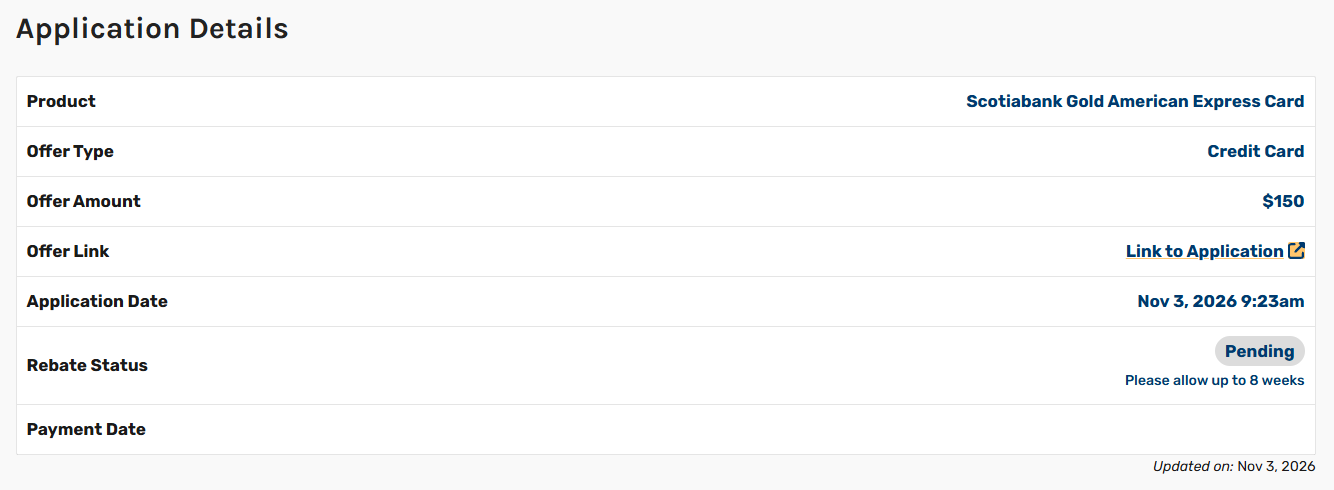
Below this information, you will find the “Additional Details” form. It is mandatory that you populate this form with the requested details.
Refer to your unique rebate application to determine what information is required, but for credit card applications, it is typically the reference number, whereas bank account applications may require something like the last four digits of the account.
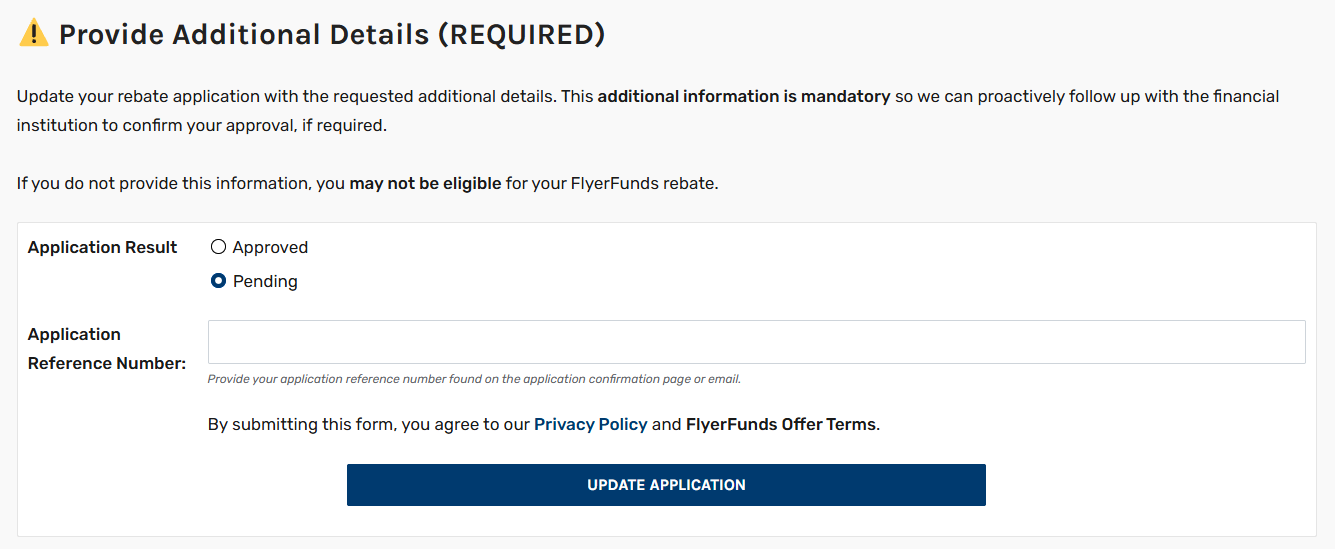
Once the additional details have been successfully submitted, you’ll see the green checkmark and your details populated in the text box.
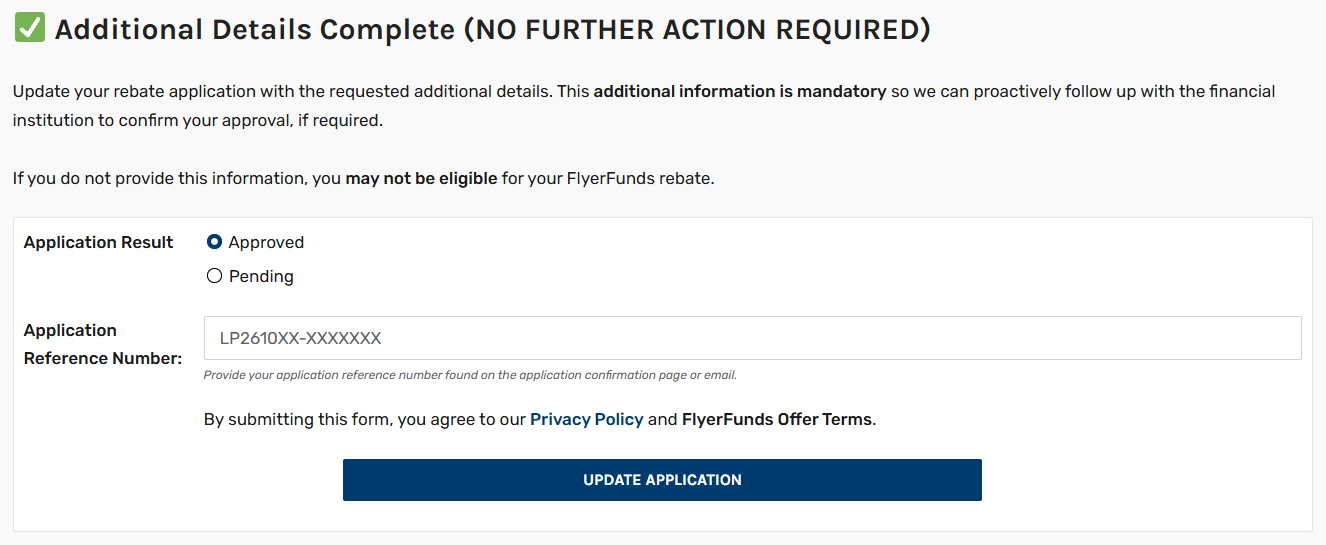
From here, all you need to do is wait for us to confirm your rebate approval and pay your rebate. Our team updates rebate statuses daily and, if required, will follow up with the financial institution to request a manual review of your rebate application if we notice that tracking hasn’t updated.
Please refrain from emailing for status updates if it has been less than 8 weeks and instead keep checking your rebate application page. Rest assured that we have a process in place to secure your rebate on the fastest possible timeline.
Once we receive confirmation of your rebate approval, you will see the status change to “Approved” on your rebate application page. Payments are sent via PayPal within 14 days of the rebate being approved, but often sooner.
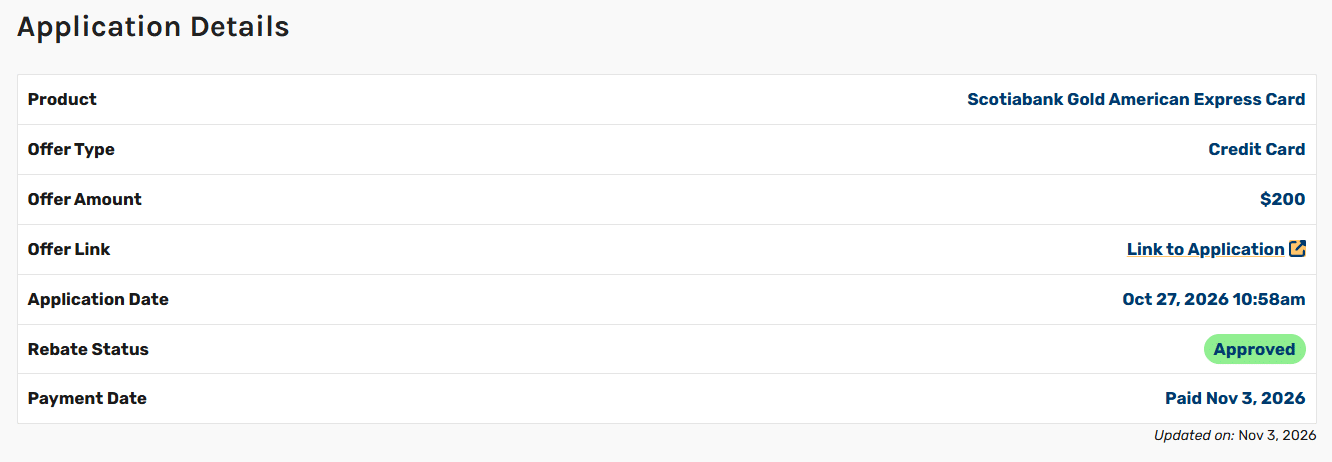
The Importance of Filling Out the “Additional Details” Section
Rebate tracking relies on browser cookies and link tracking, which are far from perfect tools. We are usually able to confirm rebate approvals seamlessly with our financial institution partners, but additional follow-up is sometimes required
In order to combat that and make the FlyerFunds rebate process smoother for our users, we request additional details upfront on your rebate application. This means that once you apply for a product, are approved, and have added your additional details, there is no further action required from you.
Most rebate sites ask you to submit a ticket if you haven’t received your rebate, adding an additional delay to the transaction confirmation process. We handle that process automatically on our end, ensuring that you don’t need to worry about your rebate at all once you’ve completed all of the required steps.
As part of our monthly process, we follow up with financial institutions regarding outstanding rebates that haven’t been automatically tracked, which is why you may see the “Undergoing Additional Verification” message on your rebate application. This isn’t a bad thing; it just means we are looking into it and aim to have your rebate approved as soon as possible.
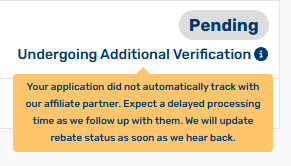
As long as you have been approved for your new financial product and have provided the required additional details, our FlyerFunds Rebates team handles everything on your behalf from there.
Monitor Your FlyerFunds Rebate Status With the Rebate Status Dashboard
The FlyerFunds Rebate Status Dashboard, also accessed from the main website navigation, is the best place to monitor your rebate applications while you are waiting to get paid.
You can easily view a summary of your FlyerFunds rebate applications over the last few years, total FlyerFunds earned, and progress towards your next loyalty bonus.
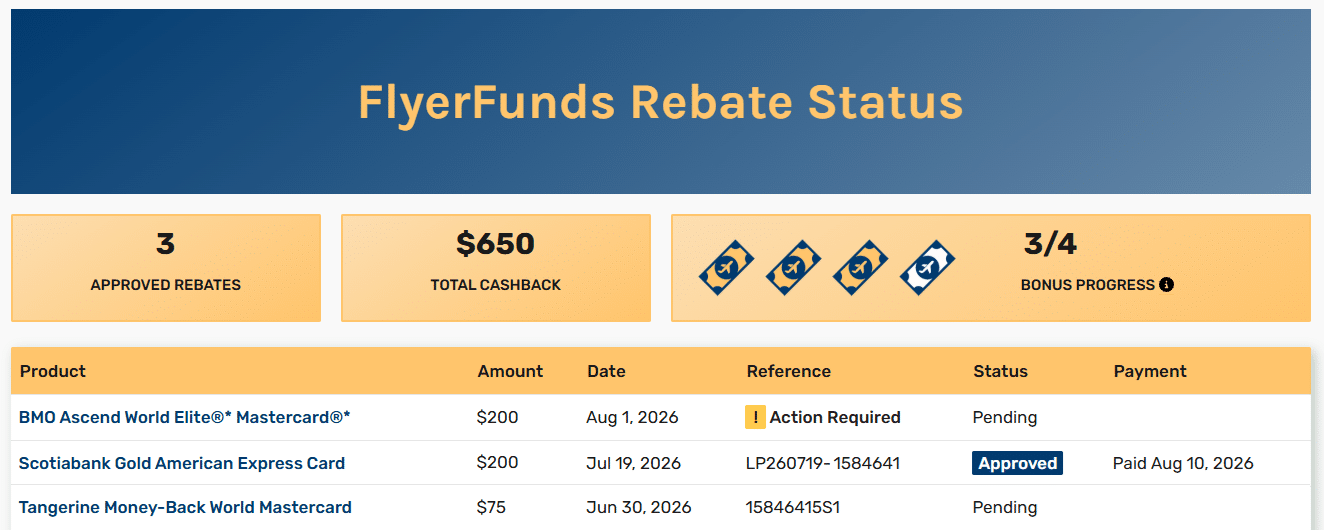
If you have forgotten to provide the required additional details, an “Action Required” flag will be displayed in the “Reference” column. You can click on that flag to access your rebate application and provide the required additional details so the flag will be removed.
You will need to be logged in to FrugalFlyer.ca to access this dashboard.
Applying for Your Next Financial Product Through Frugal Flyer
FlyerFunds are a simple way to get additional cash on your next financial product application, with minimal effort required. We’ve paid out thousands of rebates since we launched and have over 400 five-star reviews, making Frugal Flyer a trusted choice when it comes to your next credit card or bank account application.
Frequently Asked Questions
Even when signing up for the same credit card at the same time as someone else, it can take varying periods of time to confirm your approval. Things such as issues with the tracking or additional document verification can all increase the amount of time that it takes for us to receive confirmation of your approval from the financial institution.
It can take varying periods of time for us to hear back from financial institutions. Some may provide us with new data daily, while others might provide us with updates weekly or only once per month. We do update rebate status daily as we receive new information, so we can guarantee you are always seeing the most up-to-date status information that we have available.
Ensure that you have disabled ad blockers and enabled cookies in your browser before applying. Then complete the application entirely online in one go. Finally, ensure you add your required additional details once you have them. Following this process will ensure nothing on your end is holding up the rebate.
FlyerFunds rebate amounts are determined by when you applied for the financial product, not the date the rebate was generated or when the financial product was approved. If you are entitled to a higher amount, we will automatically increase the rebate amount on your behalf.
The loyalty bonus count increases upon successful rebate payment, not rebate approval. If you believe your loyalty bonus was missed, please email us at [email protected] so we can investigate.
“Undergoing Additional Verification” means that we have followed up with the financial institution to request a manual review of your rebate application, because we haven’t received any status updates yet. While this message might seem concerning, it actually means we are working behind the scenes with the financial institution to confirm your rebate approval.
Refer to your unique rebate application page to determine what additional details must be provided for your FlyerFunds rebate application. Required details will vary from financial institution to financial institution, and similarly whether you applied for a credit card or bank account.
Yes, it is okay to use whatever PayPal email address you wish when applying for a FlyerFunds rebate.
Once you generate a rebate application, you cannot self-serve to change the PayPal email address tied to that rebate application. Please contact us at [email protected], and we can change the PayPal email address on your behalf.
If your question wasn’t answered in this article, you can always email [email protected], and our FlyerFunds Rebates team will be able to assist.

Josh Bandura
Latest posts by Josh Bandura (see all)
- Review: Hotel TwentySeven Amsterdam, SLH - Nov 11, 2026
- The BMO CashBack World Elite Business Mastercard Is Now Available - Nov 9, 2026
- Miles & Points Family Travel: Experiences From Our Readers - Nov 2, 2026
- RBC Avion to Avios 30% Transfer Bonus Now Available - Nov 2, 2026
- The Hilton Honors American Express Card Launches in Canada - Oct 29, 2026

Reed Sutton
Latest posts by Reed Sutton (see all)
- Miles & Points Family Travel: Experiences From Our Readers - Nov 2, 2026
- Booked: Hairpin Turns in the Swiss & Italian Alps (With Stops in Como & Vienna) - Oct 31, 2026
- United® MileagePlus® Neo World Elite®: Earn 25,000 miles & $125 FlyerFunds - Oct 17, 2026
- What Happens to Your Points When You Die? A Guide for Collectors, Executors and Heirs - Oct 16, 2026
- How to Use FlyerFunds Rebates to Earn Extra Cash on Financial Products - Oct 13, 2026